|
A Local Dimming Monitor uses intelligent backlight control to improve contrast, deepen blacks, and reduce unnecessary power consumption. By adjusting brightness across different areas of the screen, it delivers clearer images while helping manage energy use and heat generation.
For outdoor displays, public information systems, and industrial equipment, these benefits can make a real difference. This guide explores how local dimming works, how it compares with OLED, and what to consider when choosing a display.
|
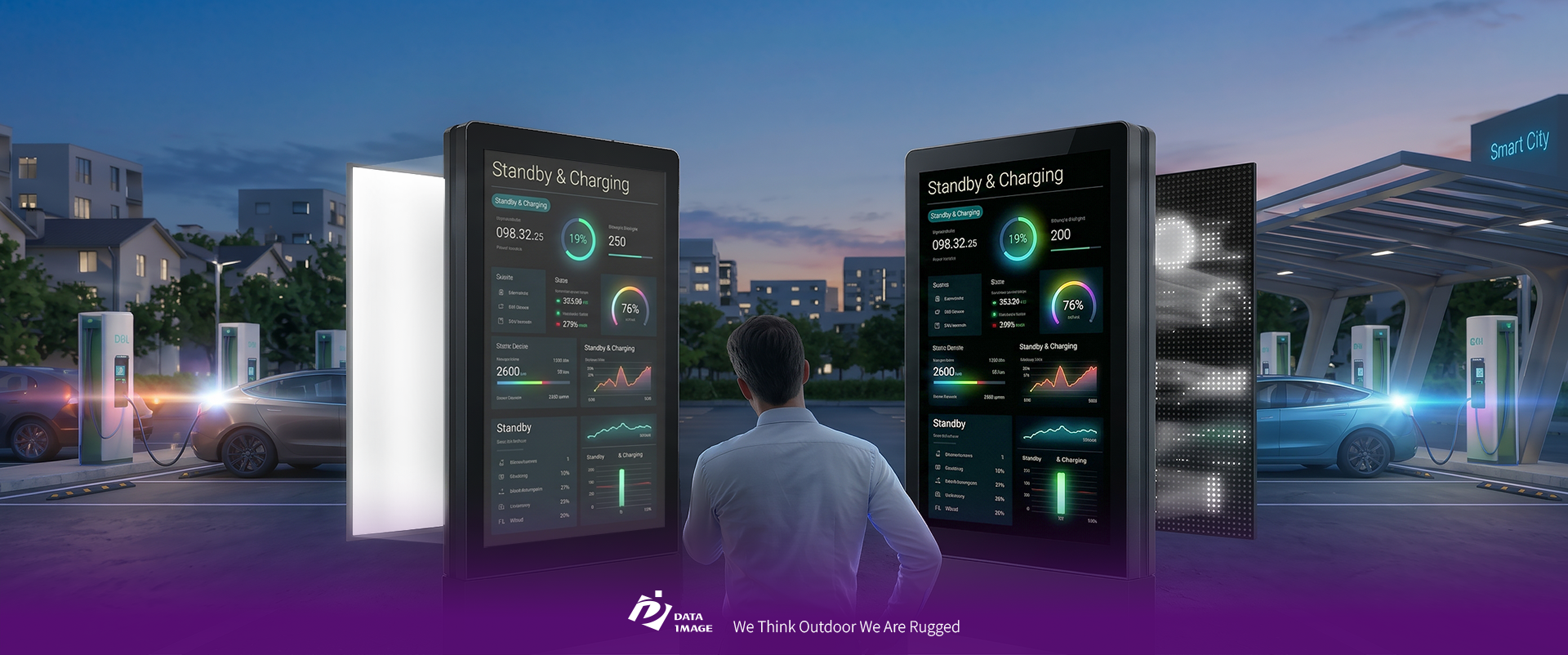
*All images are for illustrative purposes only. Actual product may vary.
|
What Is a Local Dimming Monitor? How Is It Different from a Standard LCD?
|
|
Unlike self-emissive displays, LCD panels rely on a backlight to produce visible images. Conventional LCD backlighting cannot independently adjust brightness across different areas of the screen, which may cause dark scenes to appear grayish.
A Local Dimming Monitor addresses this limitation by dividing the backlight into independently controlled zones. Bright areas receive more light, while darker areas are dimmed or switched off, improving contrast and reducing unnecessary power consumption.
| Feature |
Conventional LCD |
Local Dimming LCD |
| Backlight Control |
Backlight brightness adjusted as a whole |
Independent brightness control across zones |
| Black Levels |
May appear gray due to backlight leakage |
Deeper blacks in dimmed areas |
| Contrast |
Mainly depends on native panel contrast |
Enhanced contrast through localized backlighting |
| Power Consumption |
Limited content-based backlight savings |
Can reduce power use in darker scenes |
| System Design |
Relatively simple |
Requires zone drivers and dimming algorithms |
|
Common Backlight Technologies
Local dimming can be implemented using different backlight designs:
|
|
Edge-lit
LEDs are positioned along the screen edges, offering a relatively simple and cost-effective design with more limited local dimming control.
|
|
|
Full-Array Local Dimming (FALD)
LEDs are placed behind the LCD panel, allowing more precise brightness control across multiple zones.
|
|
|
Mini LED
Uses smaller, densely arranged LEDs to support finer backlight control and potentially hundreds or thousands of dimming zones.
|
|
|
While Mini LED offers greater control flexibility, actual image quality still depends on zone configuration and dimming algorithms.
|
Local Dimming Monitor Performance: Zone Count vs. Algorithms
|
|
When comparing Local Dimming Monitors, manufacturers often highlight the number of dimming zones. But does having more zones always mean better picture quality?
Not necessarily. Zone count determines the hardware's control precision, while dimming algorithms determine how effectively those zones respond to image content.
✔️ Zone Count: How Precise Is the Backlight Control?
Each dimming zone typically contains multiple LEDs. More zones allow the backlight to follow image brightness more closely, potentially reducing blooming—the halo effect around bright objects on dark backgrounds.
For reference, Data Image's Local Dimming Monitor lineup offers these configurations:
| Screen Size |
Resolution |
LED Count |
Dimming Zones |
| 24" |
1920 × 1080 |
1,728 |
432 |
| 32" |
1920 × 1080 |
2,304 |
576 |
| 43" |
1920 × 1080 |
2,304 |
576 |
| 55" |
3840 × 2160 |
4,608 |
1,152 |
These specifications illustrate how zone configurations vary by screen size and resolution. Importantly, the number of LEDs is not the same as the number of independently controlled zones.
✔️ Dimming Algorithms: How Naturally Does the Image Look?
Even with many zones, poor dimming control can cause flickering, abrupt brightness changes, or lost shadow details.
A well-tuned algorithm balances bright highlights, dark details, and smooth transitions between zones. Aggressive dimming may create deeper blacks but hide subtle details, while conservative dimming can preserve details at the cost of additional blooming.
For this reason, testing actual content is often more valuable than comparing zone counts alone.
|
How Does a Local Dimming Monitor Work in Professional Displays?
Local dimming relies on real-time image analysis and LED driver control to adjust backlight brightness as the displayed content changes. The process involves four main steps:
|
STEP 1. Image Analysis
|
|
|
The controller analyzes the incoming image and identifies brightness levels within each backlight zone.
|
|
STEP 2. Brightness Calculation
|
|
|
The dimming algorithm determines the required brightness for each zone, balancing image details and power efficiency.
|
|
STEP 3. Backlight Adjustment
|
|
|
LED drivers independently adjust the brightness of each zone based on the calculated values.
|
|
STEP 4. Pixel Compensation
|
|
|
The system coordinates backlight adjustments with LCD pixel transmission to help preserve image details.
|
|
|
|
By controlling brightness only where needed, a Local Dimming Monitor can improve image contrast while reducing unnecessary energy use.
|
Key Benefits for Professional Applications
|
|
HDR
Higher Contrast and Clearer Images
Local dimming allows bright areas to remain vivid while darker areas receive less backlight. This improves the visibility of text, graphics, and high-contrast content, particularly in public information displays and HDR applications.
|
|
|
Lower Power Consumption
Darker zones require less backlight power. For displays showing dark backgrounds or high-contrast graphics, this can translate into meaningful energy savings over extended operating periods.
|
|
|
Reduced Heat Generation
Dimming unnecessary backlight areas can reduce heat output, helping lower the thermal load on the display system. This is particularly useful for outdoor equipment that already faces challenging temperatures.
|
|
|
Support for Long-Term Operation
With appropriate components and thermal design, lower average backlight loads can help support efficient operation over extended periods.
|
|
|
|
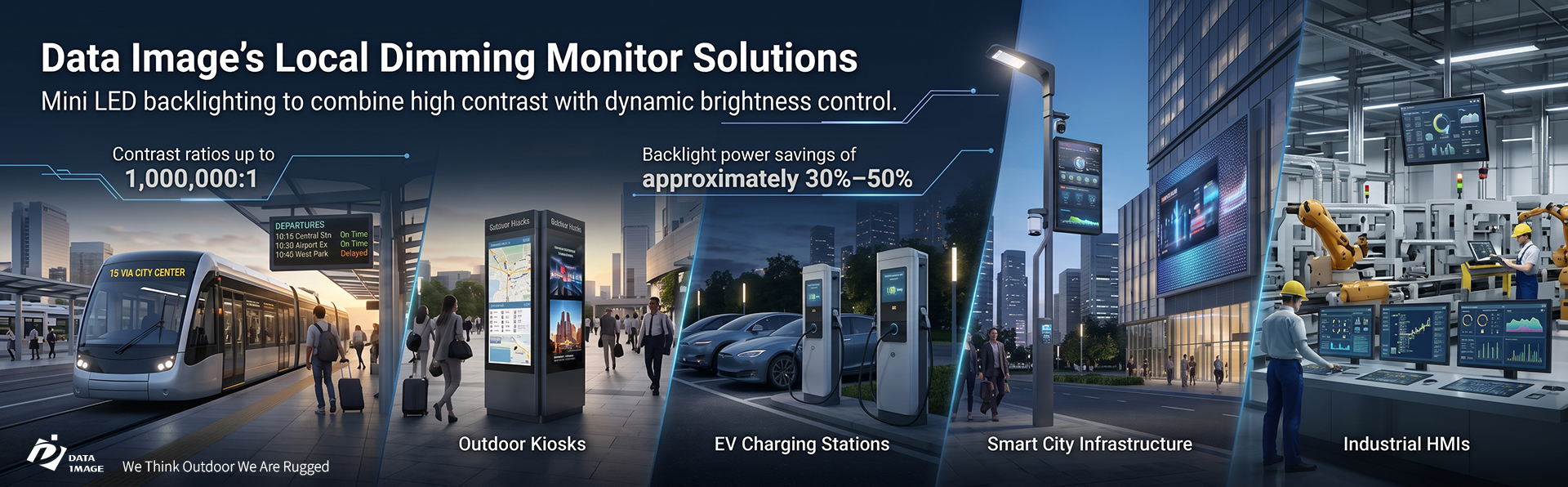
For example, Data Image's Local Dimming Monitor Solutions use Mini LED backlighting to combine high contrast with dynamic brightness control. The company's specified solutions offer contrast ratios up to 1,000,000:1 and potential backlight power savings of approximately 30%–50%, depending on content and test conditions.
These capabilities are particularly useful for transportation displays, outdoor kiosks, EV charging stations, smart city infrastructure, and industrial HMIs.
*All images are for illustrative purposes only. Actual product may vary.
|
Local Dimming LCD vs. OLED: Which Should You Choose?
|
|
Both Local Dimming LCD and OLED aim to deliver deeper blacks and stronger contrast, but they work differently. Local Dimming LCD controls groups of backlight LEDs, while OLED controls individual self-emissive pixels. This affects brightness, blooming, durability, and long-term operation.
| Feature |
Local Dimming LCD |
OLED |
| Light Source |
LED backlight with an LCD panel |
Self-emissive pixels |
| Black Levels |
Improved through zoned backlight control |
Pixels can turn off individually |
| Blooming |
Possible, depending on zones and algorithms |
No LCD backlight blooming |
| High Brightness |
Can be designed for demanding high-brightness applications |
Depends on panel design and brightness limits |
| Static Content |
Generally lower risk of permanent image burn-in |
Burn-in risk requires consideration |
| Long-Term Operation |
Suitable options available for continuous use |
Requires careful evaluation of content and thermal conditions |
| Cost |
Varies with zone count and specifications |
Varies with panel size and technology |
|
|
When Is Local Dimming LCD the Better Choice?
Local Dimming LCD is often a practical choice for displays that operate continuously or show relatively static information, such as transportation schedules, charging status screens, digital signage, and industrial monitoring systems.
Properly designed models can provide a balance of high brightness, image quality, and operating efficiency.
|
|
|
When Should You Consider OLED?
OLED is well suited to indoor environments that prioritize deep blacks, pixel-level contrast, and detailed image reproduction, particularly when content changes frequently.
Neither technology is universally better. The right choice depends on the installation environment, content, operating hours, and budget.
|
|
|
Local Dimming Monitor Buying Guide: 4 Key Factors
Choosing a Local Dimming Monitor involves more than comparing screen sizes and brightness ratings. For industrial and outdoor display buyers, these four factors can help determine whether a display is suitable for the intended application.
|
1. Evaluate Zone Count and Real-World Image Quality
Check the number of independently controlled zones, LED configuration, and dimming algorithms.
Whenever possible, test the display using your actual content, particularly dark backgrounds with bright text, maps, or high-contrast graphics. This helps reveal blooming, flickering, and shadow-detail issues.
|
2. Check Brightness, Contrast, and Operating Conditions
Peak brightness and sustained brightness are different specifications. A display rated for high peak brightness may not maintain that level across the entire screen.
Buyers should also confirm contrast measurement methods, operating temperatures, and thermal management requirements, especially for outdoor installations.
|
3. Match Screen Size and Interfaces to Your System
Different applications require different screen configurations. Compact control interfaces may prioritize touch accuracy, while large public displays may emphasize viewing distance, resolution, and content management. Data Image offers several industrial display monitors, including these Local Dimming models:
| Model |
Size |
Resolution |
Brightness |
| L-240 |
24" |
1920 × 1080 |
2,500 nits |
| L-320 |
32" |
1920 × 1080 |
2,500 nits |
| L-430 |
43" |
1920 × 1080 |
2,500 nits, 4,000 nits peak |
| L-550 |
55" |
3840 × 2160 |
2,500 nits, 4,000 nits peak |
All four models list operating temperatures of -20°C to 70°C in their detailed specifications. Interfaces and system capabilities vary by model. Specifications may vary by configuration. Please refer to the latest product documentation.
|
4. Consider Energy Costs and Total Cost of Ownership
|
Local dimming may involve higher upfront costs due to additional LEDs, drivers, and control circuitry. However, lower power consumption can help offset these costs over time.
In a Data Image internal test involving two 43-inch displays playing identical video content over 10 days, the local dimming system consumed approximately 32.6% less electricity.
Actual savings depend on content, operating hours, electricity rates, and display configuration. Testing the intended playlist before deployment can provide a more realistic cost estimate.
|
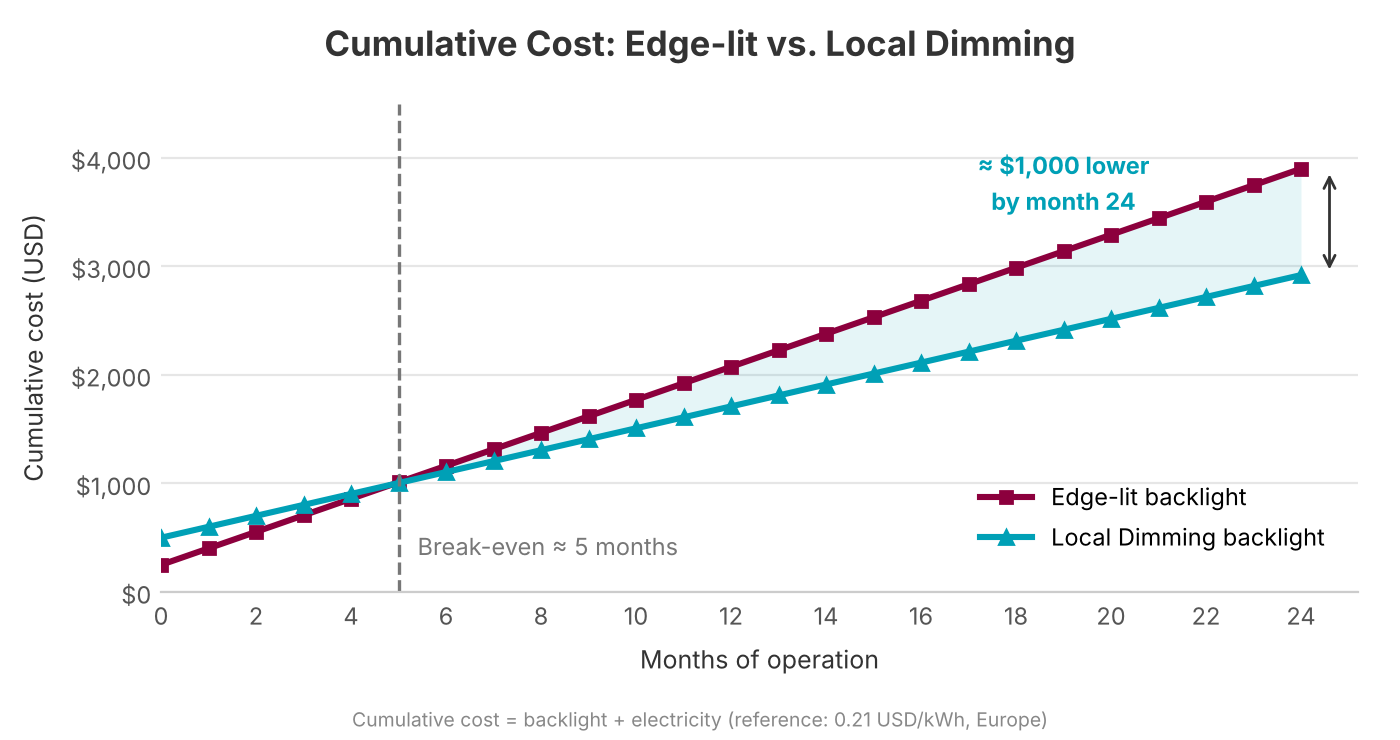
*Based on Data Image internal testing. Savings vary by content and operating conditions.
|
|
|
|
Local Dimming Monitor FAQs: 5 Common Questions
|
Q1: Why Does a Local Dimming Monitor Have Blooming?
Blooming occurs because each dimming zone covers multiple pixels. When a bright object appears against a dark background, its backlight zone may illuminate nearby areas. More zones and better algorithms can reduce blooming, but not always eliminate it.
Q2: Does More Dimming Zones Always Mean Better Quality?
No. More zones improve control precision, but driver performance and algorithms are equally important. Poor tuning can still cause flickering, delayed brightness changes, or lost shadow details.
Q3: How Much Energy Can Local Dimming Save?
Savings depend on screen content and system design. Data Image reports potential reductions of approximately 30%–50% under specified conditions, including 32.6% in its 10-day comparison test. Actual results vary.
Q4: Can a Local Dimming Monitor Be Used Outdoors?
Yes, if the display is designed for outdoor conditions. Local dimming itself does not provide weather protection, so brightness, operating temperature, thermal management, and IP-rated protection should also be evaluated.
Q5: Is Local Dimming LCD or OLED Better for Industrial and Outdoor Use?
Local Dimming LCD is often suitable for high-brightness installations, static information, and extended operation. OLED is an attractive option for indoor applications prioritizing deep blacks and premium image quality.
Choosing the right Local Dimming Monitor is about more than achieving the highest contrast or brightness. A well-matched solution should balance image quality, backlight efficiency, thermal performance, and system integration to meet the application's actual requirements.
From public information displays and outdoor kiosks to EV charging stations and industrial HMIs, Data Image offers Mini LED Local Dimming solutions in multiple sizes. With expertise in display technology, dynamic backlight control, and application-specific integration, Data Image helps manufacturers develop display systems suited to demanding operating environments.
|
Planning your next industrial or outdoor display project?
Contact Data Image to explore a Local Dimming solution tailored to your requirements.
|
|
#DataImage #LocalDimmingMonitor #LocalDimming #MiniLED #LCDvsOLED #FALD #HighBrightnessDisplay #OutdoorDisplay #IndustrialDisplay #EnergySaving #OEMODM
|
|


 Back